Answers from your catalog, not guesses
Catalog sync includes product metafields, so answers use the fields your team maintains — materials, sizing, compatibility, care. Availability comes from live inventory awareness.

Shopify · AI agent
CHATTERgo is an AI chatbot for Shopify that answers shopper questions from your synced catalog and knowledge content, works the cart (add, change quantity, apply a discount, start checkout), and sees order status and inventory. It installs from the Shopify App Store in one click and hands over to your team only when a shopper asks.
Shopify · Magento 2 · WhatsApp, Messenger, Instagram, WeChat
The challenge
The same questions arrive all day and night: “Is this in stock?”, “What’s the difference between these two?”, “Where is my order?”, “What’s your return policy?” Every one is a shopper who wanted an answer and got a queue instead.
Traditional chatbots don’t fix it. Flow builders take weeks of intent mapping, break the moment a question is phrased differently, and end most sessions with “let me connect you to an agent.”
CHATTERgo works the other way around: it reads your catalog, metafields, orders, and the knowledge content you add, then answers in conversation — and when a shopper wants a person, your team takes over with the full history attached.
Catalog sync includes product metafields, so answers use the fields your team maintains — materials, sizing, compatibility, care. Availability comes from live inventory awareness.
On Shopify, cart tools are on by default: read the cart, add products, change quantity, remove items, apply a discount, and start checkout — inside the conversation.
Logged-in shoppers are recognized through Shopify customer accounts, and multi-locale stores get local currency, pricing, and language through Shopify Markets.
Order status and inventory awareness are built in, so “where is my order?” gets a direct answer instead of a ticket.
When a shopper asks for a person, your team takes over in Conversations with the history attached — or the request goes by email or as a Zendesk or Freshdesk ticket.
The same assistant serves your storefront widget, WhatsApp Business, Messenger, Instagram, and WeChat Mini Program — one knowledge base behind them all.
Setup
Step 1
One click installs CHATTERgo and starts catalog sync — including metafields, customer accounts, and Shopify Markets locales.
Step 2
Add shipping, returns, and product documents so answers cover what your catalog alone can’t say. No flow diagrams, no intent training.
Step 3
Style the widget, set greetings, and go live. Review real conversations and adjust answers as your catalog and policies change.
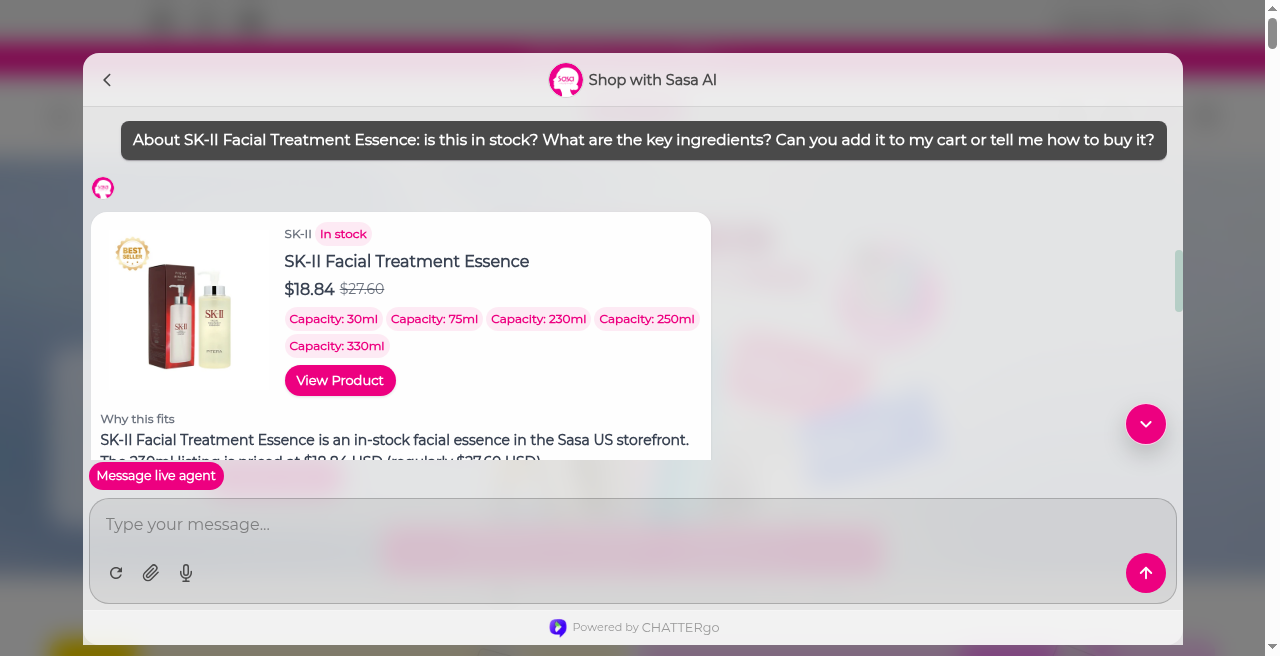
Beauty retailer, SaSa.com
The CHATTERgo consultant sits on the page, compares and recommends products, and adds the pick to the live storefront cart.
Department store
One assistant serves shoppers across categories on the storefront — from electronics to homeware.
FAQ
Shopify Inbox is a human chat tool — every conversation needs staff attention. CHATTERgo answers from your catalog, metafields, and knowledge content on its own, works the cart and checkout, covers order questions, and involves your team when a shopper asks for one.
The app installs in one click and catalog sync starts immediately. Adding knowledge content and styling the widget is self-serve. There are no flow diagrams or intent training to build.
From your store’s real data and documents: the synced Shopify catalog with metafields, live inventory and order status, customer account context, and the knowledge content you add — shipping policies, size guides, FAQs. It answers from that, not from the open web.
Your team takes over in Conversations with the full history attached, or the request goes by email or as a Zendesk or Freshdesk ticket. The shopper never has to repeat themselves.
Yes. Multi-locale stores get local currency, pricing, and language through Shopify Markets, and the assistant replies in the shopper’s language.
The Free Trial plan includes 50 conversations per month with up to 100 synced products — no credit card required. Pro is $49/month with 1,000 conversations; WhatsApp is included from the Advanced plan ($199/month). Annual billing saves 17%.
Install from the Shopify App Store, or start a free trial with 50 conversations a month — no credit card required.
Explore the shopper experience, a commerce workflow, or both. Tell us where you want to start.
Checking form availability…