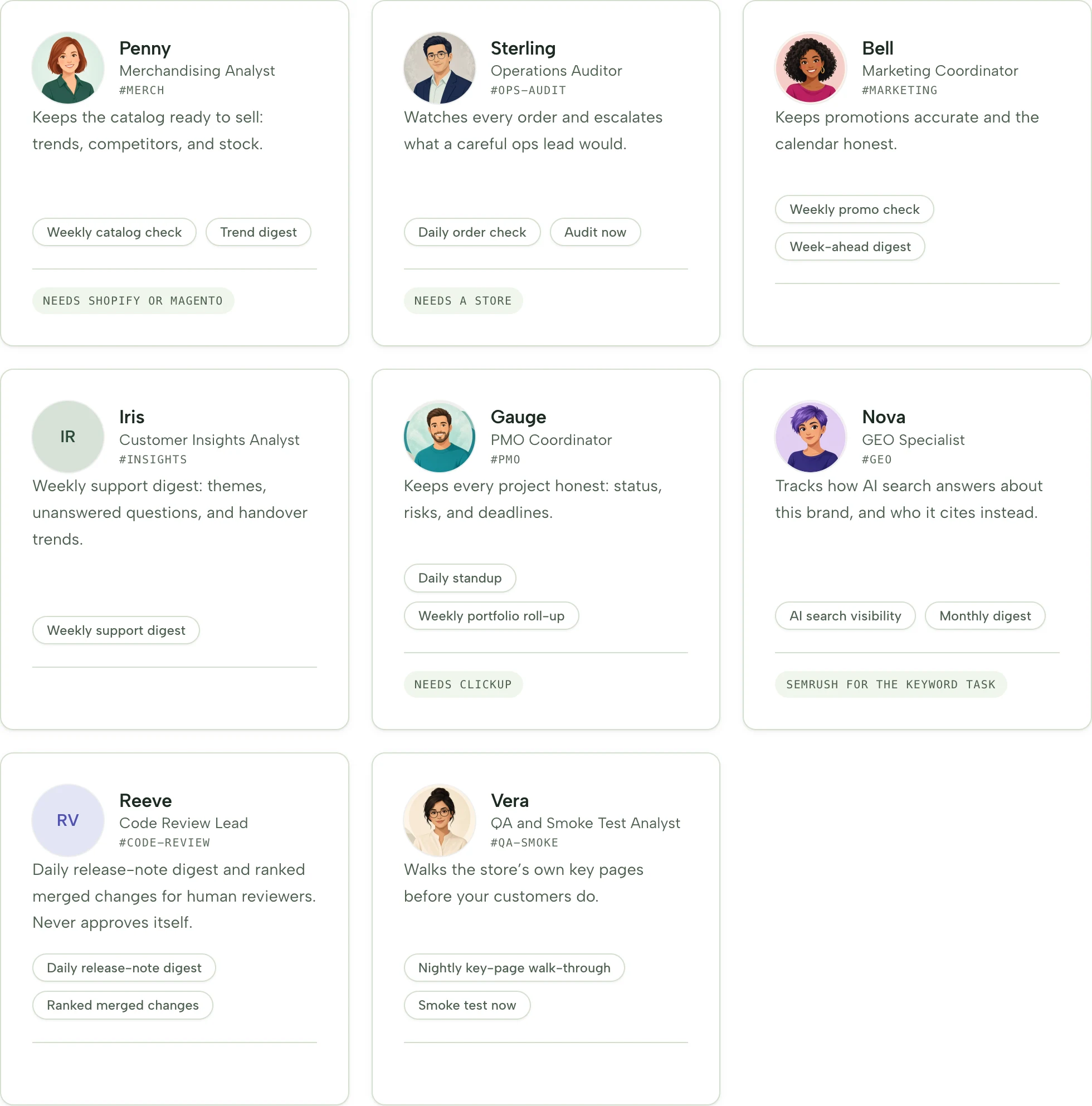
AI colleagues are agentic teammates that work alongside your ecommerce team: they review your catalog, order, campaign, customer, and search signals on a schedule, then deliver finished work — slides, PDF, Word, or Excel — by email. CHATTERgo ships ready-made colleague roles (Penny, Sterling, Bell, Iris, Nova) for merchandising, operations, marketing, insights, and search.
Deliverables by email · Microsoft Teams (staff, on request) · Agent Studio for Agents and Runs
8 — role templates ship in the productSlides · PDF · Word · Excel — deliverables your team can openSchedule · by hand · email — three ways to trigger a jobPer-colleague — permissions — you decide what each can see
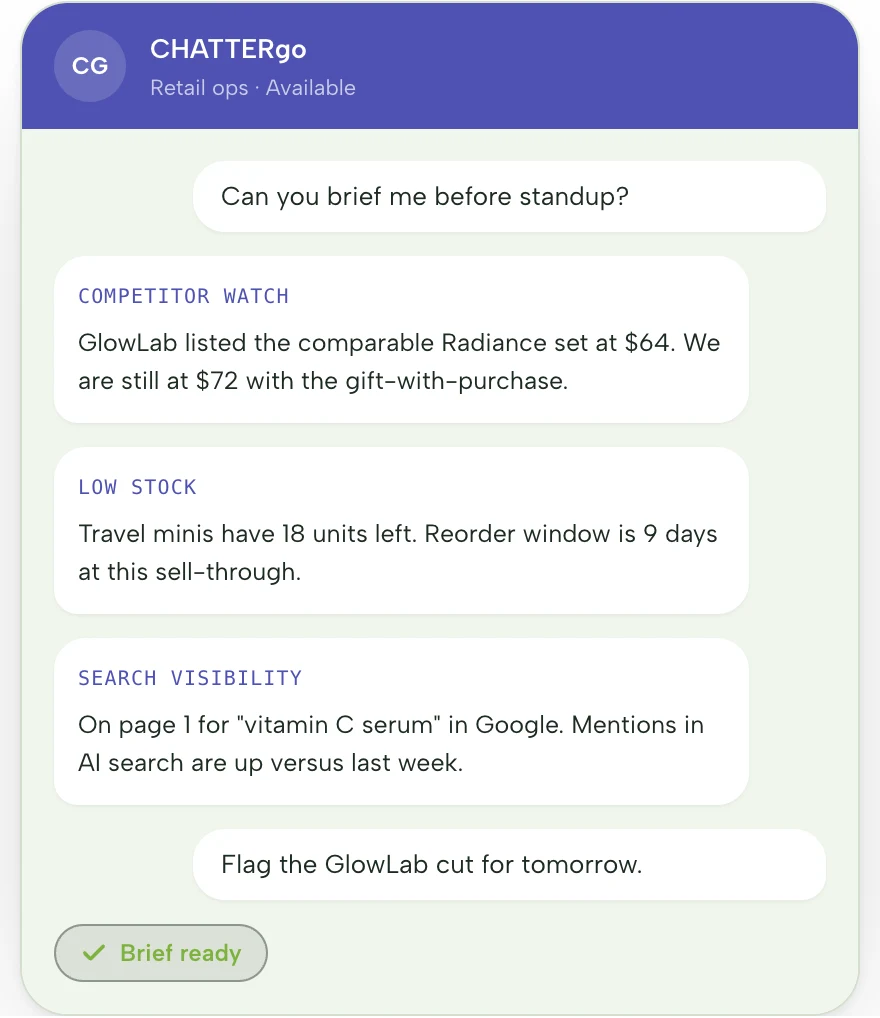
The shipped role templates — each colleague arrives with a persona, a charter, a desk, and starter tasks. Or build your own from scratch.Chat where your team works — a colleague briefs you in Microsoft Teams before standup.
The challenge
Where does your team’s week actually go?
Into recurring work: the weekly merchandising review that someone assembles by hand, the catalog checks nobody has time to finish, the campaign report that means exporting three CSVs and praying the numbers line up.
Every one of these jobs is predictable, repeatable, and needed again next week — which is exactly why they’re expensive. Either a skilled teammate spends hours on them, or they slip when the week gets busy.
An AI colleague changes who does them: a teammate with its own role, instructions, memory, and desk that runs the checks on schedule and sends a finished file — while your team keeps the judgment calls.
Meet the colleagues
A ready-made role for every commerce job
Start from a role template — Penny, Sterling, Bell, Iris, and Nova each ship with a persona, a charter, a desk, and starter tasks. Eight templates exist in the product, and you can also build a colleague from scratch.
Runs on a schedule, by hand, or from an email
Catalog health, unusual orders, promo conflicts, support themes, search visibility — recurring jobs run without anyone remembering to run them, or kick off on demand when you need a one-off.
Work that lands as a file
Each run writes a usable deliverable — slides, PDF, Word, or Excel — not a wall of chat. Open it, work it, forward it.
Sees only what you allow
You decide what each colleague can see and do. Findings arrive with source context, so your team can verify before acting.
A desk of its own, with memory
Every colleague has its own instructions, memory, desk, and files. Agent Studio lets you manage Agents and Runs — pick a shipped template or start from scratch.
Chat where your team works
Chat privately or @mention them in a Microsoft Teams channel, with the report and its attachment posted alongside. For staff, not shoppers — available on request.
Setup
How do you hire an AI colleague?
Step 1
Pick a role template — or start from scratch
Eight role templates ship in the product. Pick the one closest to the job, or open Agent Studio and build your own from a blank desk.
Step 2
Connect sources and set the job
Point the colleague at the store, catalog, order, campaign, or search signals it needs. Set the trigger — schedule, by hand, or an incoming email — and what it may see and do.
Step 3
The first report lands
Review the file — slides, PDF, Word, or Excel — refine the colleague’s instructions, and let the schedule take over. Adjust any time.
What lands in your inbox
Catalog health review
Excel · on schedule
Broken variants, missing fields, and price conflicts flagged in a spreadsheet your team can work through — with source context on every finding.
Promo conflict check
PDF · by hand or from email
Overlapping promotions and pricing conflicts surfaced before they reach customers, in a file you can drop straight into the weekly review.
FAQ
Frequently asked questions
What are AI colleagues?
AI colleagues are agentic teammates for your team: software coworkers with their own role, instructions, memory, and workspace. Unlike a chat assistant, a colleague owns recurring jobs — runs them on a schedule, by hand, or from an email — and delivers finished work as files your team can open and act on.
How are AI colleagues different from AI agents or copilots?
A copilot assists in the moment, inside a conversation. An agent answers or acts when asked. An AI colleague owns a recurring job end to end: it knows when to run, what to check, and what “done” looks like — a usable file with source context. Think teammate with a job description, not a tool.
Which roles ship today?
Eight role templates ship in the product. The five commerce templates highlighted on this page cover merchandising, operations, marketing, insights, and search — Penny, Sterling, Bell, Iris, and Nova, each with a persona, charter, desk, and starter tasks. You can also build a colleague from scratch.
Where do the deliverables go?
Reports land by email as slides, PDF, Word, or Excel, and are kept in the colleague’s workspace. Microsoft Teams delivery and chat are available on request, for staff.
What can each colleague see and do?
You decide, per colleague: which sources it reads — store, catalog, order, campaign, customer, or search signals — and what it may do. Every finding arrives with source context so your team can verify before acting.
Do AI colleagues replace my team?
No. They take the recurring checks and report assembly that eat your team’s week, and hand back files with a clear next step. The judgment — what to change, what to escalate, what to stop — stays with your people.